
Guides › Quitting an app
Deleted TikTok and reinstalled it again? How to break the loop
7 min read
If you've deleted TikTok or Instagram and reinstalled it a day later, you're in very good company — people talk about doing it seven times in a year. Deleting removes the app, not the habit, and getting it back takes ten seconds. The fix isn't more willpower. It's making the reinstall slow, awkward, or impossible, and having a plan for the moments that send you back.
Why you keep reinstalling apps you deleted
The app was never the whole habit. The habit is the bus ride, the queue, the five minutes before bed, the "I'll just check" after a long day. Delete the app and every one of those moments is still there tomorrow, now with a gap where the feed used to be.
Then the gap meets the App Store. The icon is one search away, your account is still logged in, and nothing asks you to wait. The common reasons people give for going back are small and specific:
- "Just for one thing." A friend's birthday post, a link someone sent, a video everyone's talking about.
- A bad evening. Tired, bored or low, and the old way of switching off is ten seconds away.
- A new phone. Setup restores everything, and the app comes back without you deciding anything.
None of that is a character flaw. It's what happens when the cue stays and the barrier is a single tap. So the fixes below are ranked by how much they raise that barrier.
How to stop redownloading apps (strongest fixes first)
1. Make reinstalling hard: turn off Installing Apps
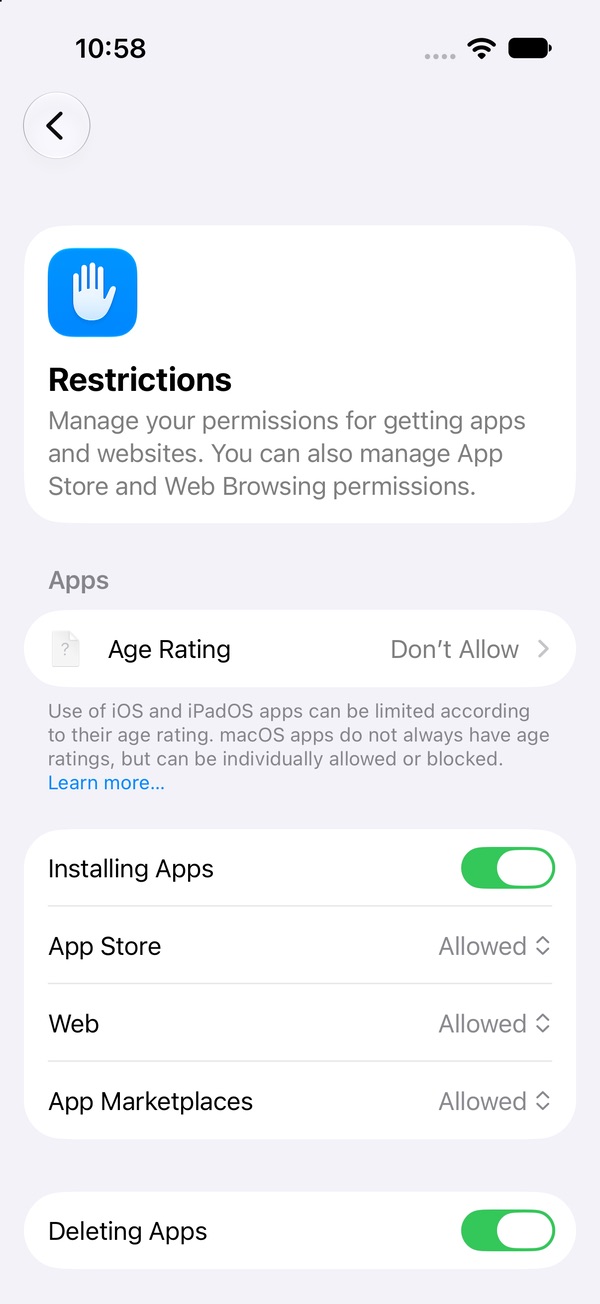
iPhone can block app installs entirely. In iOS 27 it lives in Settings › Screen Time › Apps & Websites › Restrictions: turn off Installing Apps. With it off, you can't download anything until you switch it back on.
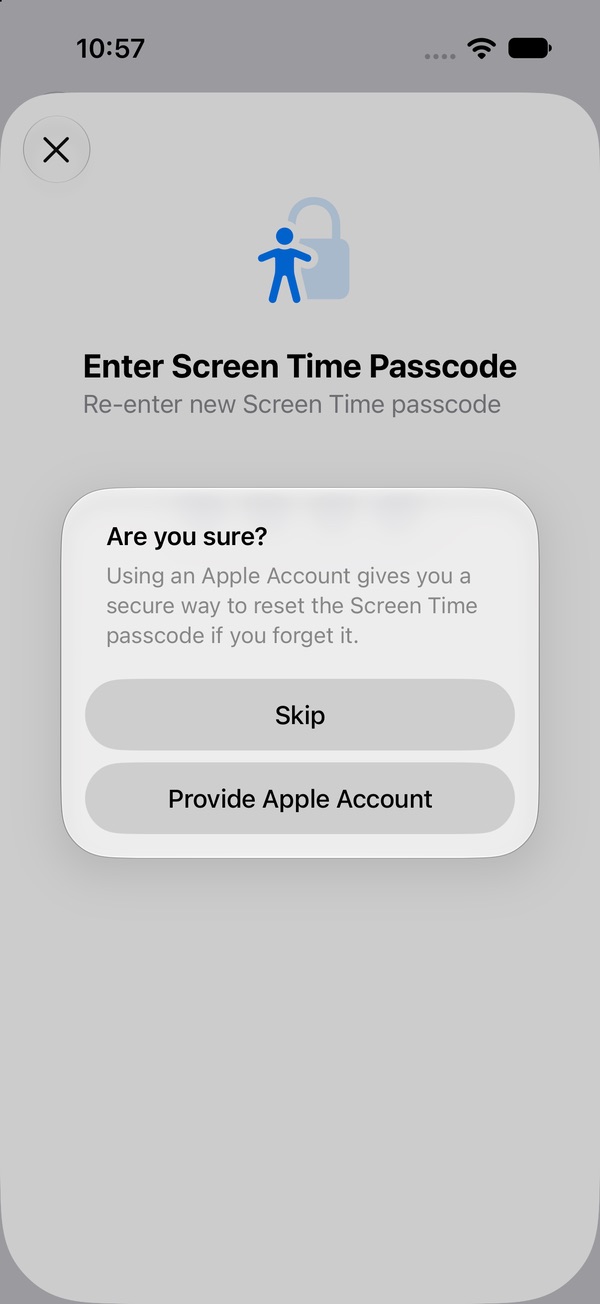
On its own that switch is only a speed bump, because you can flip it back in a few seconds. The part that makes it hold is a Screen Time passcode you don't know. Go to Manage Screen Time › Lock Screen Time Settings and hand the phone to a partner, roommate or sibling to type the code. When iOS offers Screen Time Passcode Recovery with an Apple Account, let them use theirs, or skip it, so a password reset can't quietly undo the lock. The same screen has Deleting Apps; turning that off too stops a blocker app from being deleted on a bad night.
If you need a new app later, ask your passcode holder. That small conversation is the point: a reinstall now needs a second person and a reason. Step-by-step: stop yourself reinstalling apps → · Set a passcode that holds →
2. Log out, deactivate or delete the account
If the account is still logged in, a reinstall puts you straight back in your feed. Logging out first adds a password between you and the scroll. Going further, most social apps let you deactivate (hide your account; usually undone just by logging back in) or delete it (permanent, though many platforms hold it for a grace period first). Deactivating is a softer barrier; deleting is a real one. Check the platform's own help page for how long the window is and what you'd lose, and save anything you want to keep before you go.
3. Don't let a new phone reinstall it for you
Restoring from a backup or transferring from your old iPhone brings your apps back. When you set up a new phone, check the Home Screen and App Library afterwards and delete the app before you open it once. If Installing Apps is off on the new phone too, it can't creep back in.
4. Plan the "just for one thing" moments
Most reinstalls start with a real reason. Decide in advance how you'll handle the usual ones, so the answer is ready before the urge is:
- A friend's post or a link: open it in a browser on a laptop, where there's no endless feed waiting under it. Or ask the friend to send a screenshot.
- Messages from people: move those conversations to texts or another chat app you don't scroll.
- "Everyone's talking about it": ask someone to tell you about it. It's rarely as good as the description.
Writing it down as an if–then rule helps: "If I want to see a friend's post, then I check it on my laptop." Across dozens of studies, plans that name the moment and the action in advance helped people follow through noticeably better than plain intentions (Gollwitzer & Sheeran, 2006).
5. Watch for the feed swap
A common surprise: TikTok is gone, and now it's X, or Reels, or YouTube Shorts for an hour. The urge found the nearest feed. That's not failure; it's information. Put a limit on the replacement too — in iOS 27 you can build a Custom category in Time Allowances with just the apps you've swapped to and give it a small daily allowance. Set up Time Allowances →
What the first two weeks feel like
People who quit tend to describe the same arc. The first 24 hours are the easiest to break: your thumb goes to where the icon used to be, and every quiet minute feels longer. Over the first two weeks, the pull comes in waves, often at your old scrolling times: on the bus, after dinner, in bed. Boredom shows up more than you expected, and so does a vague feeling of missing out.
An urge builds, peaks and eases if you don't feed it. You don't have to win the argument with it; you only have to outlast the wave. Have something small ready for those times — a podcast, a walk, a text to someone. And if you do reinstall, it's one slip, not the end. Delete it again, look at what set it off, and adjust the plan. What to do after a slip →
Lock it instead of deleting it
The loop exists because a deleted app is one download away. With Pactroll, the app stays on your phone but locked — so there's nothing to reinstall, and no "just this once" trip to the App Store. At the moment you'd normally be tapping Download, you tap "I feel the urge" instead: a short guided break to name what's going on, then five minutes doing something else. If the urge is still there after two rounds, the app opens for 15 minutes and locks again on its own.
Get Pactroll on the App StoreFAQ
Why do I keep reinstalling TikTok after deleting it?
Deleting removes the app, not the moments that sent you to it, and getting it back takes about ten seconds. The loop breaks when reinstalling stops being easy, not when you try harder.
How do I stop myself from redownloading apps on iPhone?
Settings › Screen Time › Apps & Websites › Restrictions › turn off Installing Apps. Then set a Screen Time passcode (Manage Screen Time › Lock Screen Time Settings) and let someone else choose it.
I reinstalled Instagram just to check one thing. Did I ruin it?
No. One reinstall doesn't erase the days before it. Delete it again, note what the one thing was, and plan another way to handle it next time.
Is deactivating my account better than deleting the app?
It adds a step the app alone doesn't. Deactivation is usually undone by logging back in, so it's a softer barrier; account deletion often has a grace period. Check the platform's help page.
How long until I stop wanting to reinstall it?
It varies. People describe the first day and the first two weeks as the hardest stretch; the waves get easier to ride out the more often you let one pass.