
Guides › Stop scrolling
How to stop scrolling at night and actually sleep
6 min read
You get into bed at 11, open the phone "for a minute," and look up at 2 AM. The fix that people repeat most: charge your phone outside the bedroom and use a cheap alarm clock. Then back it up with a Screen Time Schedule that ends at your bedtime, grayscale, quiet notifications, and something else ready for the last 20 minutes of the day.
Why you can't stop scrolling in bed
At night every advantage is on the feed's side. You're tired, and tired is when "one more" is hardest to refuse. The phone is already in your hand. And the feed has no last page — no episode end, no chapter break, nothing that says "this is a good place to stop." So the decision to stop has to come from you, at exactly the hour you're worst at making it.
A lot of people describe scrolling well past the point of enjoying it: not laughing, barely watching, just unable to put it down. Others recognise the urge to stay up because the late hours are the only part of the day that feels like theirs.
What is revenge bedtime procrastination?
That second feeling has a popular name: revenge bedtime procrastination — staying up late to win back free time after a day that didn't give you any. It's an internet term, not a diagnosis. Researchers study the broader pattern as bedtime procrastination: going to bed later than you intended when nothing outside you is stopping you (Kroese et al., 2014). If that's you, the answer isn't only less phone. It's also a bit of protected time for yourself earlier in the evening, so midnight doesn't have to be the only window.
Scrolling at night with ADHD
Many people with ADHD describe this especially strongly: the feed is the easiest thing in the room to keep looking at, time disappears, and "I'll stop after this one" doesn't stick. If that sounds familiar, lean harder on the changes below that remove the decision altogether — distance and locks — rather than the ones that rely on stopping yourself in the moment.
How to stop using your phone before bed
1. Charge your phone outside the bedroom
This is the tip people repeat most, because it works without willpower: you can't scroll a phone that's in the kitchen. Buy a cheap alarm clock so the phone isn't your alarm, plug the charger in somewhere you'd have to get up and walk to, and put the phone there when you start getting ready for bed — not when you're already in it. If the bedroom is the only option, put the charger across the room, out of arm's reach.
2. Set a Screen Time Schedule that ends at bedtime
In iOS 27, Downtime is now called Screen Time Schedule, and it works the other way round: you set the hours when apps are allowed, and outside them only your Always Allowed apps work. To build a night cut-off:
- Go to Settings › Screen Time › Screen Time Schedule and turn on Schedule.
- Under "Allowed Every Day," tap the time window (for example "All Day 6 AM – 11 PM") and set the end time to your bedtime.
- Under Allowed Categories, tick what's fine during the day, then save with ✓.
- Open Always Allowed and add anything you want after bedtime — an audiobook or podcast app, for example. Phone, Messages, FaceTime and Maps are there by default.
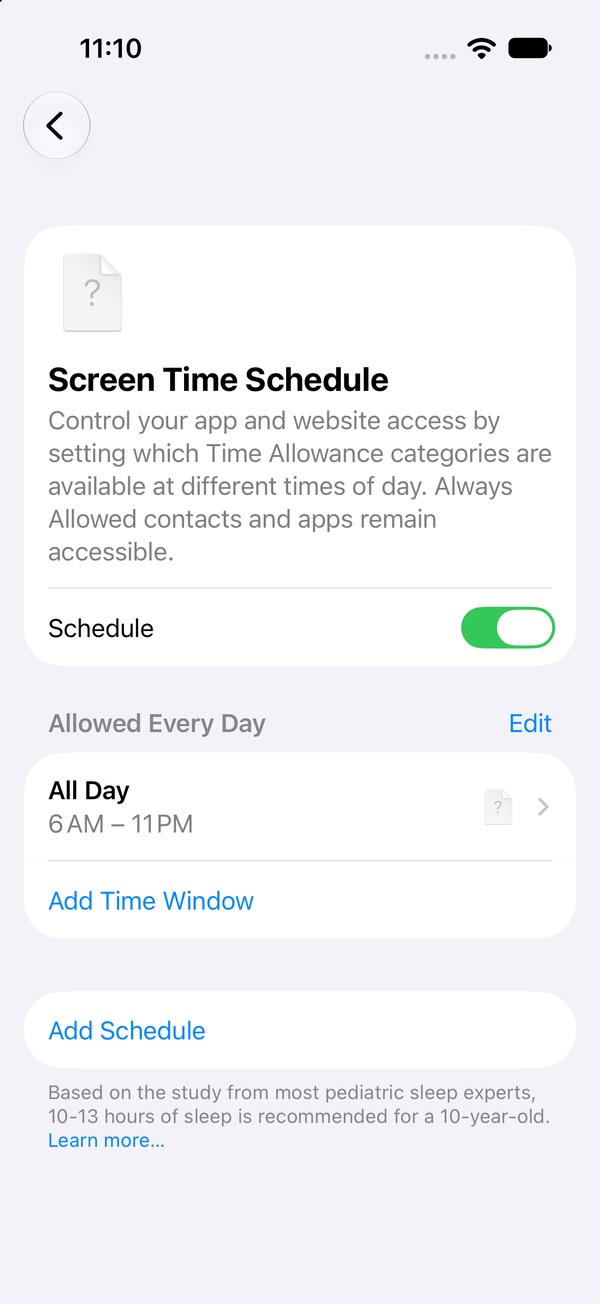
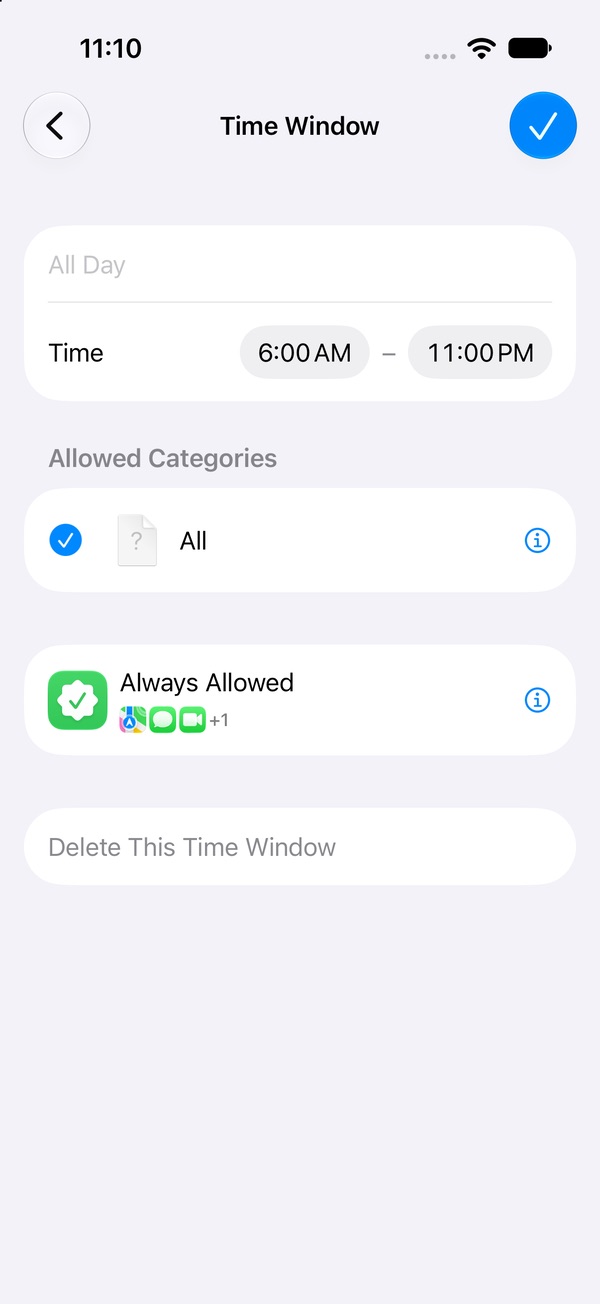
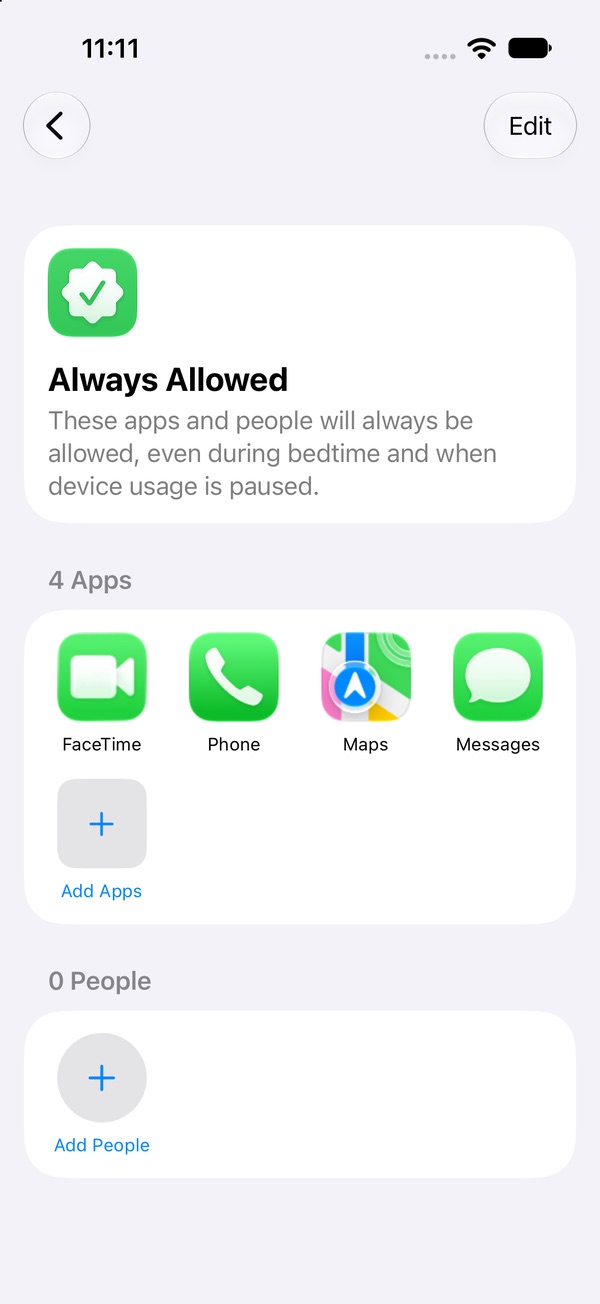
Weekends different? Use Add Schedule to give Friday and Saturday a later end time. One catch: if you know the Screen Time passcode, you can change all of this at 11:05 PM. Having someone else set it closes that gap. Full Screen Time Schedule guide → · Set a passcode that holds →
3. Turn on grayscale
A grey feed is a duller feed. Plenty of people say grayscale is what finally made late-night scrolling feel pointless, and it costs nothing to try. Go to Settings › Accessibility › Display & Text Size › Color Filters, turn on Color Filters, and choose Grayscale. To flip it on and off quickly, add Color Filters to Settings › Accessibility › Accessibility Shortcut; then a triple-click of the side button (the Home button on older iPhones) toggles it. Grayscale also stays on when Night Shift kicks in.
4. Silence notifications at night
A buzz at 11:30 PM is an invitation back in. Set a Focus to turn on by itself: Settings › Focus, pick Sleep or Do Not Disturb, and tap Add Schedule to start it a little before bed. Choose which people can still reach you under People.
5. Plan the last 20 minutes
The phone was filling a gap between "done with the day" and "asleep." Take it away and the gap is still there, so fill it on purpose: a paper book, an audiobook or podcast, a few stretches, tomorrow's list on paper. Make it an if–then rule — "If I get into bed and want my phone, then I pick up the book" — and set it out before you need it.
If you still end up scrolling at 2 AM
It'll happen some nights. One late night doesn't undo the ones that went well. The next morning, look at what made it easier — phone on the pillow, a bad day, a notification — and change one thing. What to do after a slip →
Lock the apps you scroll at night
Distance works best when you don't have to create it fresh every evening. Pactroll locks the apps you scroll in bed and keeps them locked until you decide otherwise. When you reach for them anyway, tap "I feel the urge": a short guided break to name what's going on, then five minutes doing something else — often long enough for the urge to pass. If it's still there after two rounds, the apps open for 15 minutes, then lock again on their own.
Get Pactroll on the App StoreFAQ
Why can't I stop scrolling in bed even when I'm tired?
Being tired makes stopping harder, the phone is already in your hand, and the feed never offers a natural stopping point. Changes you make earlier in the day, like charging the phone elsewhere, work better than deciding at midnight.
What is revenge bedtime procrastination?
A popular term for staying up late to win back time that feels like your own. Researchers study the broader pattern as bedtime procrastination: going to bed later than you meant to when nothing is stopping you.
How do I block apps at night on iPhone?
Downtime is now Screen Time Schedule in iOS 27: Settings › Screen Time › Screen Time Schedule. Turn on Schedule and end your time window at bedtime; after that only Always Allowed apps work.
Does grayscale actually help you stop scrolling?
Many people say it makes the feed easier to put down, and it's free to try: Settings › Accessibility › Display & Text Size › Color Filters › Grayscale.
What should I do instead of scrolling before bed?
Something with an end and no feed: a paper book, an audiobook or podcast, stretching, tomorrow's list on paper. Pick it before bedtime.