
Guides › Stop scrolling
How to stop scrolling and start studying (when your phone wins every time)
7 min read
If your phone wins every study session, stop trying to beat it halfway through. Make the decision before you sit down: phone in another room, social and video apps blocked for your study hours, and short sprints with a clear finish line. Willpower at minute twelve is the weakest tool you've got. Distance and a lock that's already on do the work for you.
Why you can't focus because of your phone
Studying, especially before an exam, is heavy and vague: a lot to do, no clear place to start, and a low-level dread that sits on top of it. The feed is the opposite — light, instant, and always one tap away. So when the textbook feels bad, the phone offers a way to feel better right now. Researchers describe procrastination in much the same terms: a way of repairing your mood in the short term, at the expense of the person who has to study tomorrow (Sirois & Pychyl, 2013).
That's not laziness, and it's not a lack of caring about the exam. Often it's caring a lot and finding that hard to sit with. It also explains why "just focus" doesn't work: every check is a fresh decision, and you make it at the exact moment the work feels worst. The fixes below take the decision out of those moments.
How to stop scrolling and start studying
1. Put your phone in another room (not face down on the desk)
This is the advice people repeat most, and the reason is simple: you can't scroll a phone that's in the kitchen. Face down on the desk still means one reach. In another room means standing up, walking, and noticing what you're doing — and that pause is where you get to change your mind.
You may have seen the "brain drain" study behind this tip. In 2017, Ward and colleagues found people scored better on memory and problem-solving tests when their phone was in another room rather than on the desk. Later attempts to repeat it, including a direct replication in 2022, didn't find the same effect. So don't count on a brain boost. Count on the distance.
If you use the phone for a timer, get a cheap kitchen timer. If you need it for a login code, fetch it, use it, put it back.
2. Block social apps during study hours with a Screen Time Schedule
In iOS 27, Downtime is now called Screen Time Schedule, and you set the hours when app categories are allowed. That makes study blocks easy to build:
- First make the categories you'll switch off. Go to Settings › Screen Time › Time Allowances › Manage Categories, tap +, and add Social Media and Entertainment (or a Custom one — see the next step).
- Open Screen Time Schedule and turn on Schedule.
- Split your day into windows. For example: 6 AM–4 PM with everything ticked, a Study window from 4 PM to 7 PM where Social Media and Entertainment aren't ticked, then 7 PM–11 PM with everything back on. Use Add Time Window for each one.
- Only study on weekdays? Tap Add Schedule, pick those days, and give that schedule the study window.
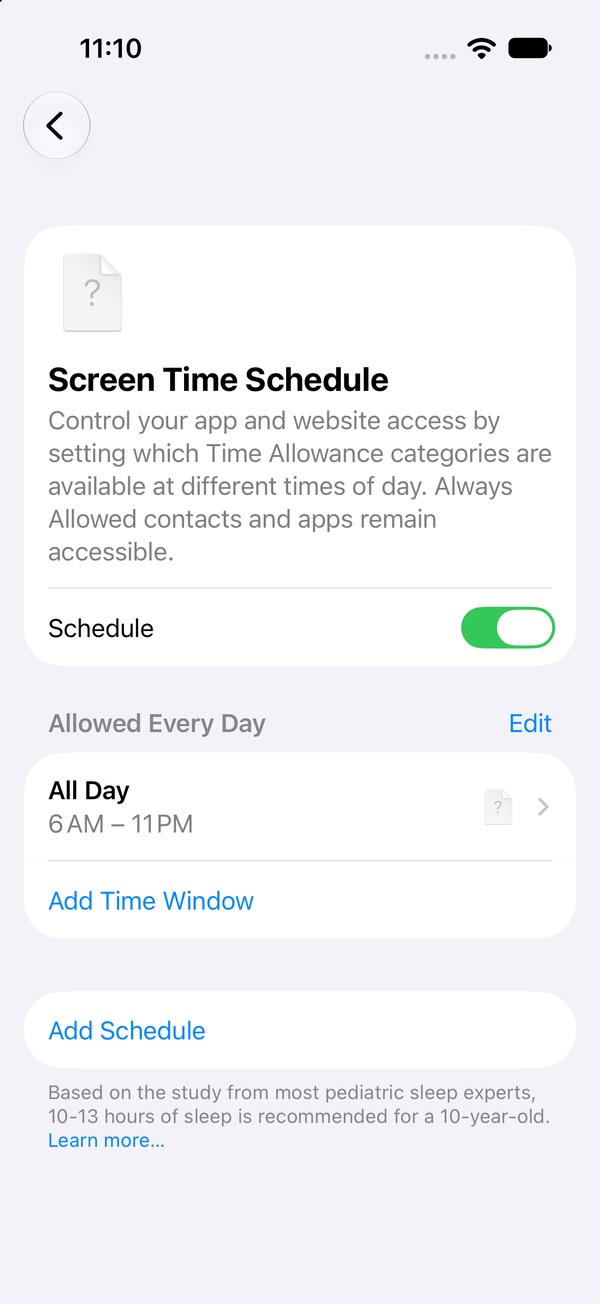
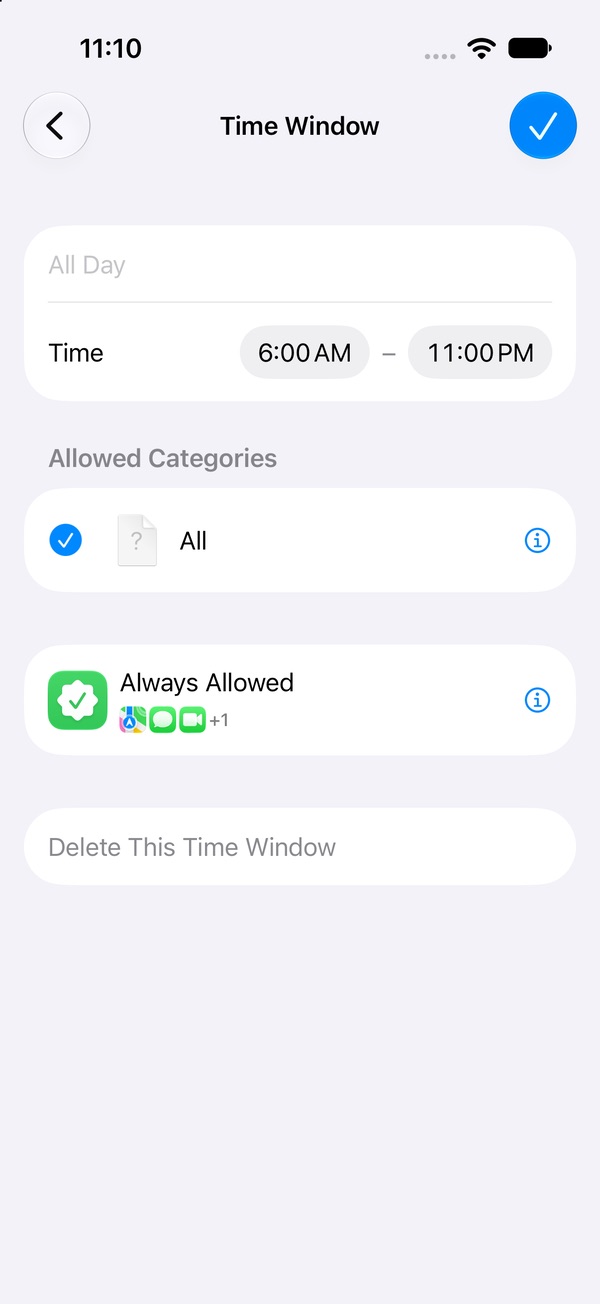
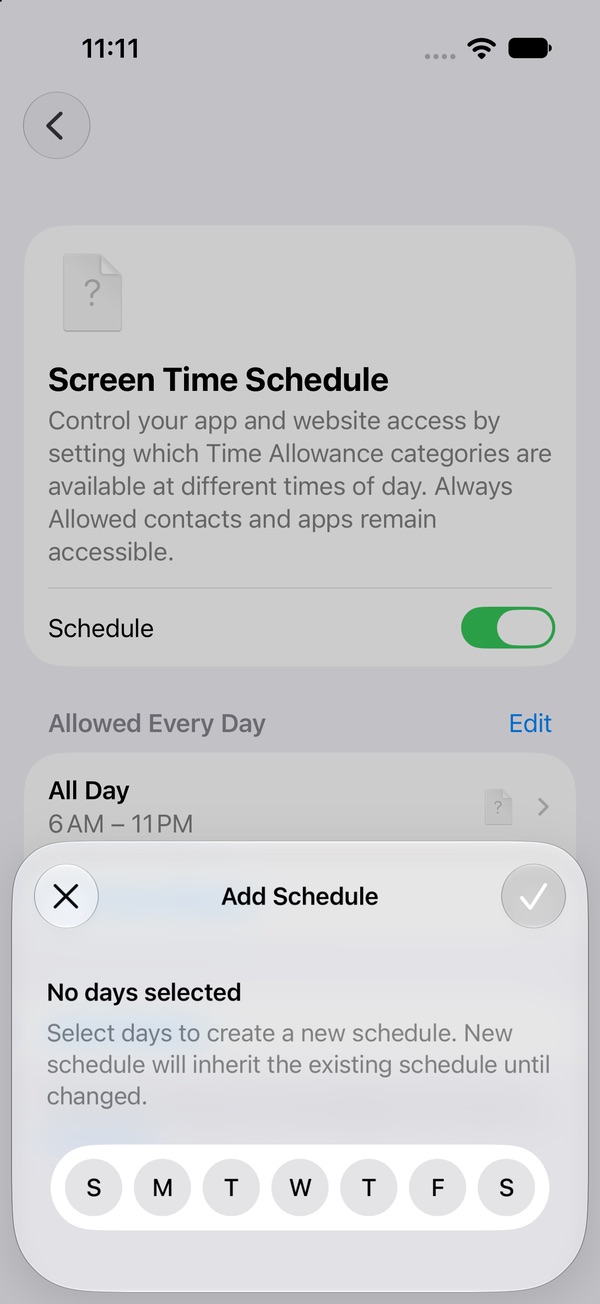
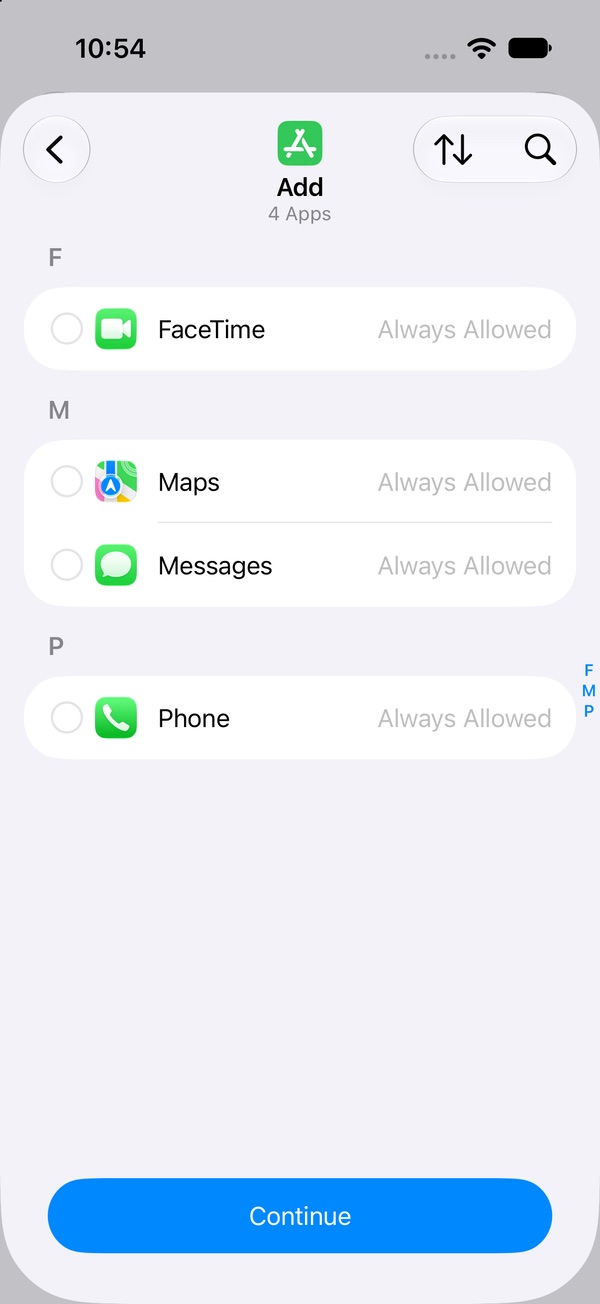
Want the whole phone quiet during study time? Leave those hours out of every window. Outside your windows, only Always Allowed apps work — Phone, Messages, FaceTime and Maps to start with. And because you can change all of this yourself in ten seconds, ask a parent, sibling or roommate to set the Screen Time passcode. Full Screen Time Schedule guide → · Set a passcode that holds →
3. Give your scroll apps a small daily allowance
A schedule covers study hours. A Time Allowance (the old App Limits) caps the rest of the day, so "one quick look" between sessions has a ceiling. To limit just the apps that get you, build a Custom category: Time Allowances › Manage Categories › + › Custom, name it, tick TikTok, Instagram, YouTube or whatever your weak spot is, tap Continue, and set the time per day.
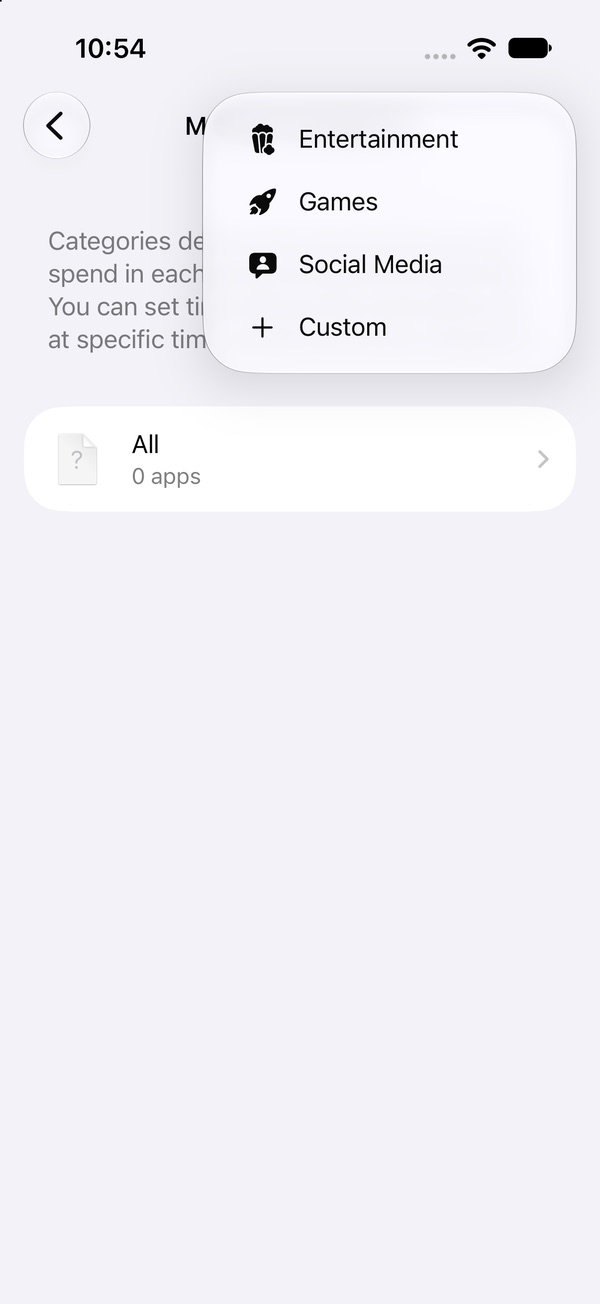
We're re-checking the "time's up" screen on iOS 27 and will update this page. How to set Time Allowances →
4. Make an if–then plan for the "just checking" thought
The urge will still show up, phone or no phone. Decide now what you'll do when it does, in one sentence: "If I want to check my phone, then I finish this paragraph and write the thought on a sticky note." Plans that name the moment and the action in advance helped people follow through noticeably better than plain good intentions across dozens of studies (Gollwitzer & Sheeran, 2006). When it hits anyway, give it five minutes before you decide; urges tend to rise, peak and fade. What to do when the urge hits →
5. Study in short sprints with a phone-free break rule
"Study all evening" is the kind of vague, heavy task that sends you to the feed. A sprint isn't: 25 to 50 minutes, one specific goal ("10 flashcards," "question 3"), timer on, go. If you can't start at all, make it ten minutes and one page. Starting is usually the hardest part.
The rule that makes sprints work: breaks don't include the phone. Stand up, refill your water, walk to the end of the street, stretch, eat something. The feed has no last video, so a five-minute scroll break has a way of becoming forty. If you want the phone as a reward, put it at the end of the session, not between sprints.
6. Slipped mid-session? Here's what to do next
You'll look up some days and realise half an hour went to the feed. Skip the lecture to yourself; it costs more time than the scroll did. Instead:
- Put the phone back in the other room.
- Write down exactly where you stopped, so restarting isn't a fresh decision.
- Do one ten-minute restart sprint on the easiest next bit.
- Later, note what pulled you in — a notification, a hard question, being tired — and change one thing for tomorrow.
One lost half-hour doesn't make the day lost, and one bad day doesn't undo a good week. What to do after a slip →
Lock the apps before you open the textbook
Pactroll locks the apps that eat your study time and keeps them locked until you decide otherwise — no schedule to build, no categories to sort. When you reach for one at minute twelve, tap "I feel the urge": a short guided break to name what's going on, then five minutes doing something else. If the urge is still there after two rounds, the apps open for 15 minutes and lock again on their own, so a break can't quietly turn into the evening.
Get Pactroll on the App StoreFAQ
How do I stop getting distracted by my phone while studying?
Decide before you sit down, not halfway through. Put the phone in another room, block social and entertainment apps for your study hours with Screen Time Schedule, and study in short sprints with one clear goal each.
Does putting your phone in another room help you focus?
A well-known 2017 study found people did better on memory and problem-solving tests with their phone in another room, but later replications, including a direct one in 2022, did not find the same effect. The practical reason still stands: a phone you have to get up and fetch gives you a pause before every check.
How do I block apps while studying on iPhone?
In iOS 27, make categories in Settings › Screen Time › Time Allowances (Social Media, Entertainment or a Custom one), then in Screen Time Schedule add a study time window where those categories aren't ticked. Have someone else set the Screen Time passcode so you can't undo it mid-session.
Why do I procrastinate on TikTok before exams?
Researchers describe procrastination as a way to feel better right now: studying feels heavy and vague, the feed feels light and instant. It's mood repair, not laziness, which is why making the start smaller and the feed further away works better than guilt.
What should I do on study breaks instead of scrolling?
Something with a built-in end: stand up, refill your water, walk to the end of the street, stretch, eat something. The feed has no last video, so a five-minute scroll break rarely stays five minutes.