
Guides › Quitting
How to stop being addicted to your phone: a 3-step plan you can set up tonight
Takes about 10 minutes to set up · 7 min read
If you keep picking up your phone and losing an hour you never meant to spend, you're far from the only one, and it isn't a character flaw. Much of it happens on autopilot: your thumb opens the app before you've decided anything. So instead of asking you to try harder, this plan changes what happens in that moment. Lock the apps, decide now what you'll do when the urge hits, and give the urge five minutes to pass. It works for any app: short videos, social media, YouTube, shopping, games.
- 1. Lock the apps Screen Time, a 0-minute allowance, and a passcode someone else holds. About 5 minutes
- 2. Write your urge plan What you'll do the moment you reach for a locked app. About 3 minutes
- 3. Ride out the urge Five minutes of something else, then decide. Every time it hits
First: why trying harder doesn't work
Think about the last time you opened an app without meaning to. You probably didn't decide to. You were bored, waiting, putting something off, or the phone was simply in your hand, and your thumb went to the usual spot. That's how habits work: after enough repeats, the situation sets off the action directly, without checking with you first. So "I'll just use it less" rarely holds. The decision you're counting on never gets a vote.
This plan doesn't ask you to win more arguments with yourself. It puts a stop in the autopilot (the lock), has something ready for you to do at that stop (your plan), and gets you through the few minutes when the pull is strongest.
On autopilot
- Bored, waiting…
- Thumb taps the app
- An hour later…
With a stop in the way
- Bored, waiting…
- Thumb taps the app
- Locked
- Your plan
What does "autopilot" mean here?
Habit researchers use the word for actions that a familiar situation sets off by itself. In diary studies by Wendy Wood and colleagues, students noted what they were doing every hour; between a third and a half of their actions were habits, done almost daily in the same place, and during those habits their thoughts were often on something else. Later work describes habits as switched on by context cues, like a place, a time of day or the action just before, so they can start without a decision and run with little conscious control.
Phones fit this neatly. A 2012 study by Antti Oulasvirta and colleagues found that much smartphone use is "checking": quick, repeated looks at content that's one tap away, tied to familiar situations like boredom, and that checking can lead into longer use. Interestingly, people in that study described it as more of an annoyance than an addiction. That's the useful part: it's a learned loop, not a flaw in you, and loops can be interrupted.
Wood, Quinn & Kashy (2002). Habits in everyday life: thought, emotion, and action. Journal of Personality and Social Psychology. Neal, Wood & Quinn (2006). Habits: a repeat performance. Current Directions in Psychological Science. Oulasvirta, Rattenbury, Ma & Raita (2012). Habits make smartphone use more pervasive. Personal and Ubiquitous Computing.
Step 1: Lock the apps with Screen Time (about 5 minutes)
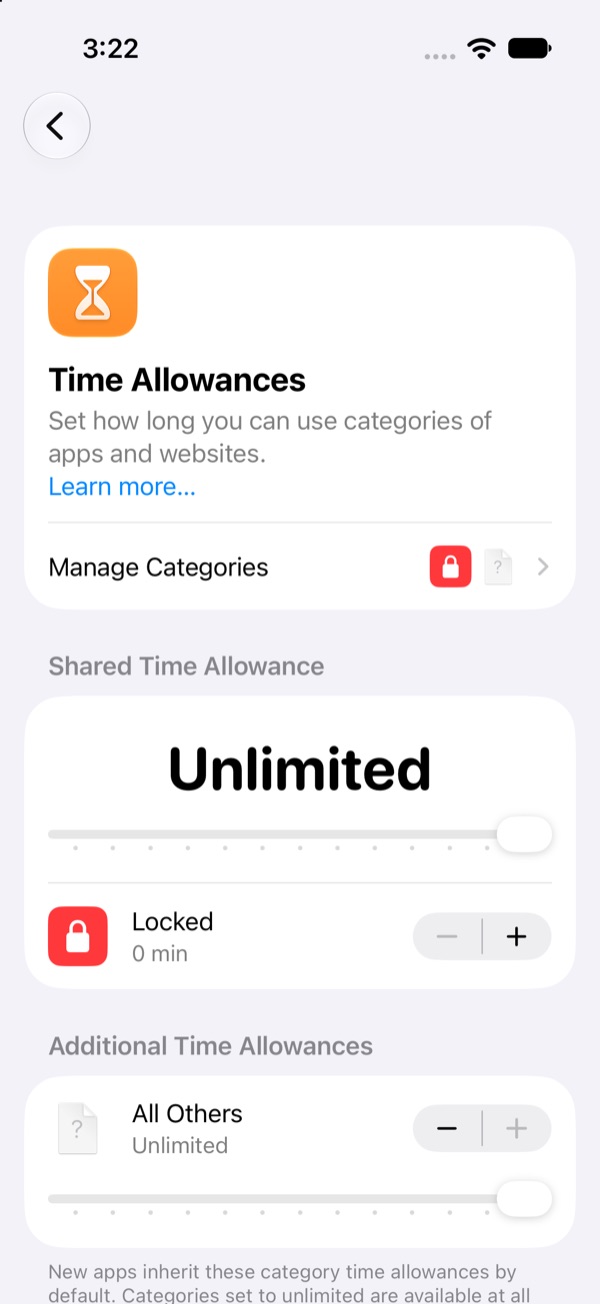
Your iPhone can do this on its own, no app needed. In iOS 27 the old App Limits are called Time Allowances, and the trick is to give your apps an allowance of zero.
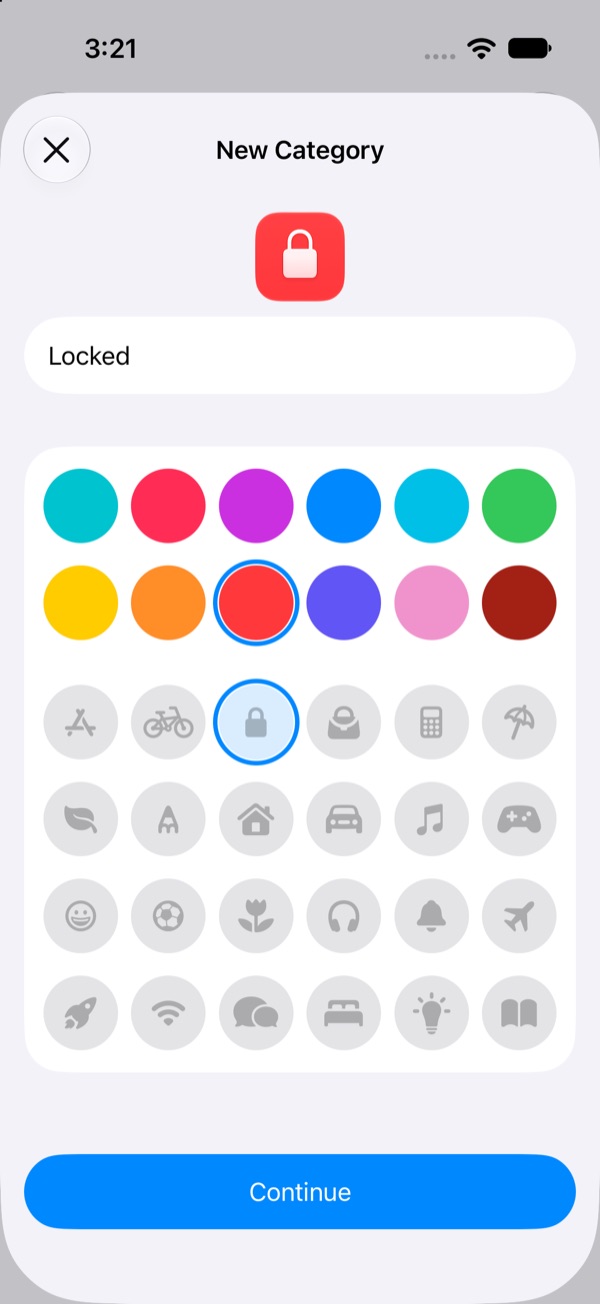
- Open Settings › Screen Time › Time Allowances › Manage Categories, then tap + › Custom.
- Name it (we used "Locked"), pick a colour and an icon, and tap Continue.
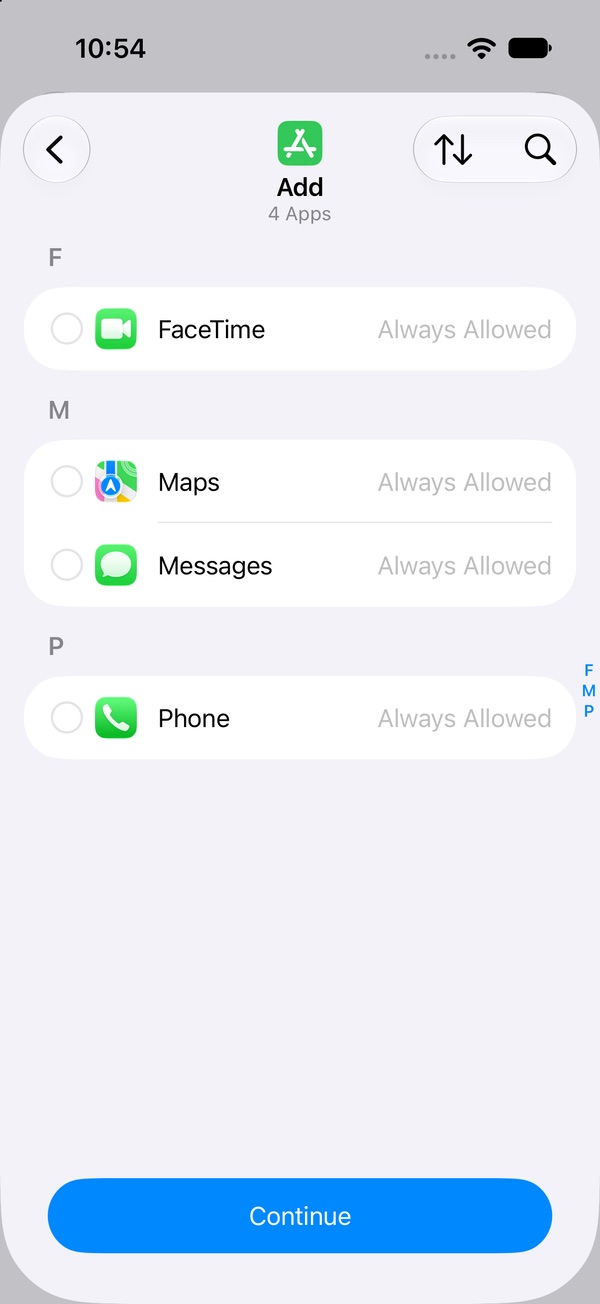
- Tick every app you want locked. The search button finds them fast. Tap Continue.
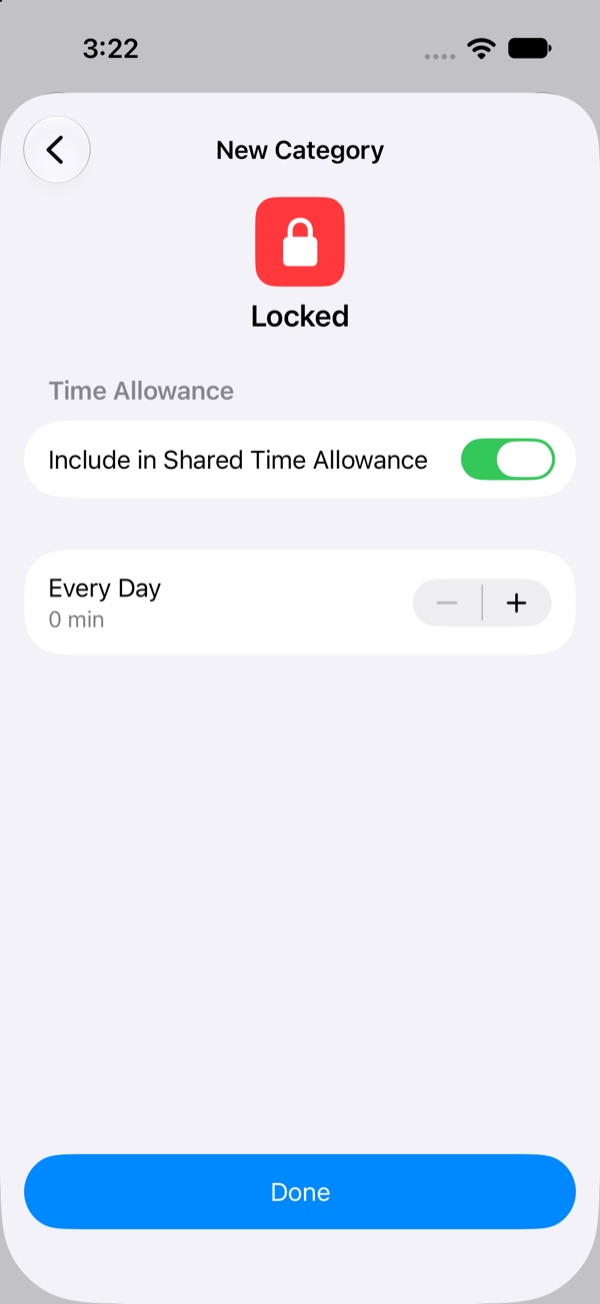
- iOS asks when this category is allowed each day. You can leave it and tap Continue.
- On the Time Allowance screen, tap − until it reads 0 min. It drops 5 minutes a tap down to 10, then one minute at a time. Tap Done.
Then let someone else set the passcode
A limit you can change is a limit you'll change at 1 AM. Go to Settings › Screen Time › Manage Screen Time › Lock Screen Time Settings and hand the phone to someone you trust to type the four digits. At Screen Time Passcode Recovery, let them use their Apple Account. Now changing your allowance asks for a code you don't know. Full walkthrough →
And close the delete-and-reinstall exit
If deleting the app is your escape hatch, reinstalling it is too. In Settings › Screen Time › Apps & Websites › Restrictions, turn off Installing Apps (and Deleting Apps while you're there). How →
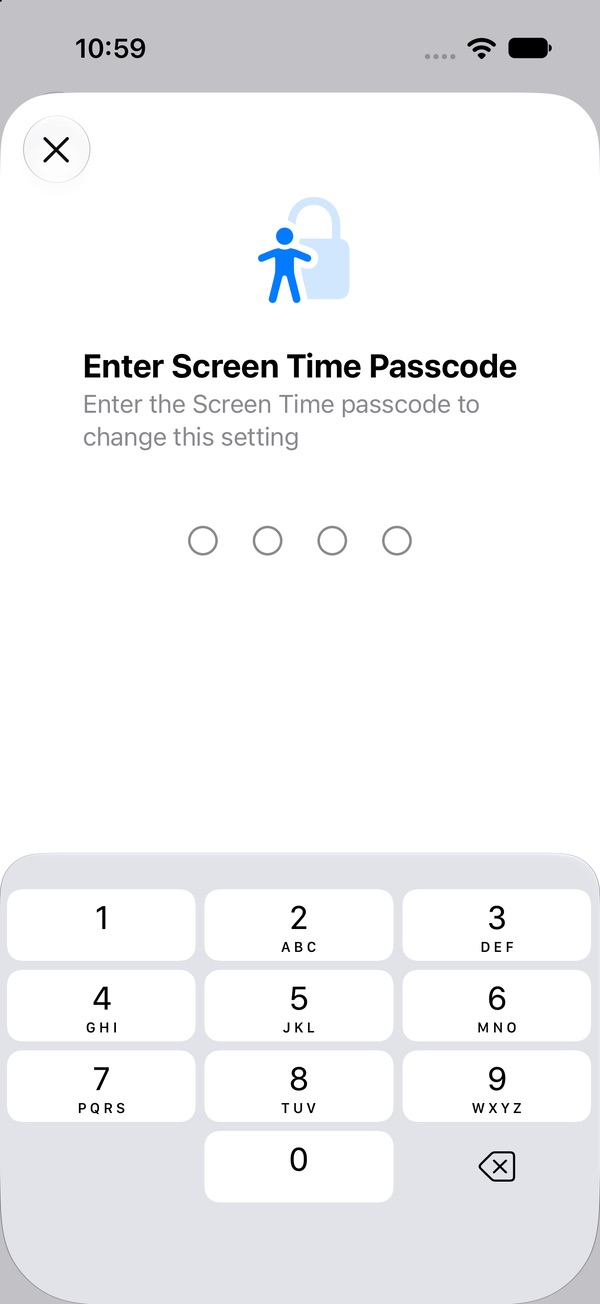
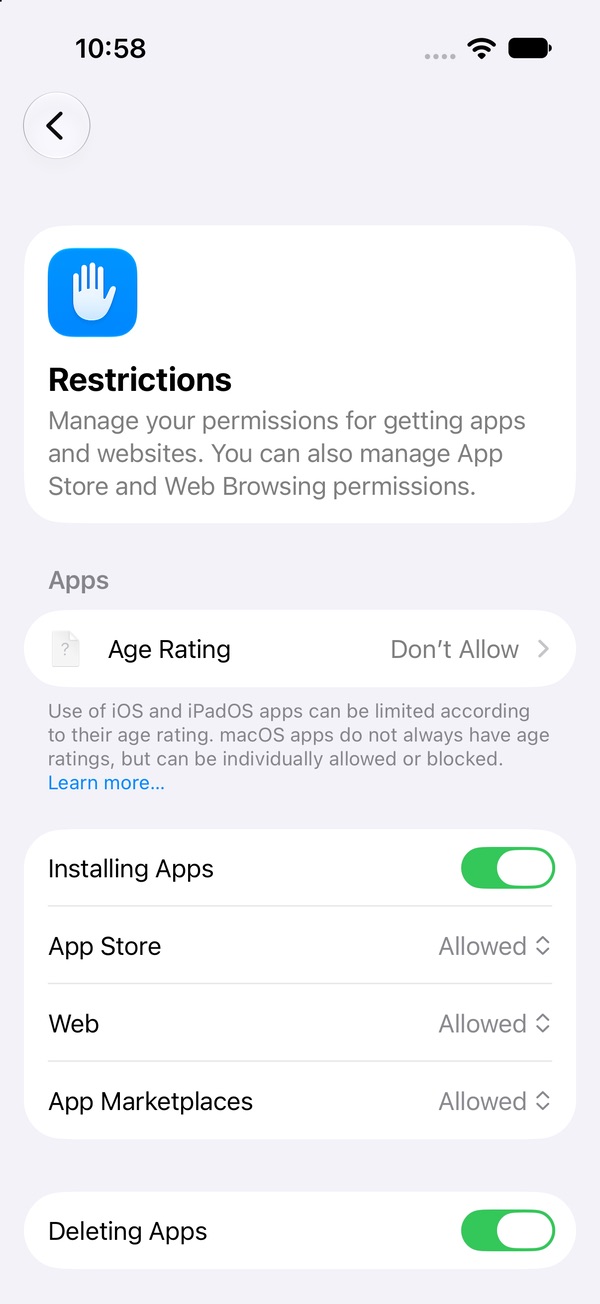
One honest note: we haven't been able to test the "time's up" screen on iOS 27 yet. On earlier versions, Screen Time limits could be ignored unless a Screen Time passcode was set. That's why the passcode step matters most.
Why does just seeing the app make it worse?
Seeing, hearing or even thinking about something tied to a habit (an icon, a notification sound, a friend's post) can set off a craving on its own. Researchers call it cue reactivity, and it shows up across smoking, alcohol and other drugs. Each time the app is one tap away, the cue and the action sit side by side. The lock pulls them apart, and fewer cues (notifications off, the app off your home screen) means fewer urges to begin with.
Carter & Tiffany (1999). Meta-analysis of cue-reactivity in addiction research. Addiction.
Step 2: Write your urge plan now, while you're calm (about 3 minutes)
The moment you hit the lock is the worst moment to decide what to do instead. So decide now. Tie the moment you'll recognise ("I reached for a locked app") to a few specific steps. Copy this into your Notes app and make it yours:
My urge plan
When I reach for a locked app, I will:
- Say what's going on. Bored, lonely, stressed, habit, missing out, or just craving? Pick the closest one.
- Do one thing from my list for 5 minutes. Set a timer.
- Check in when it rings. Still want it? One more round, with something different.
- Then it's my call. Opening it after two real tries is a decision, not a failure.
For "my list", pick five or six things that use your hands or feet and don't need your phone. Some that work:
- 3 sets of push-ups
- Walk downstairs and back
- One whole song, start to finish
- 10 slow, deep breaths
- A glass of water, slowly
- Cold water on your face
- Phone in another room
- Tidy one small corner
- Message a friend about anything else
Make it easy to find: pin the note, or write the list on a sticky note where you charge your phone. If one item never works for you, swap it out.
What is an if–then plan?
Psychologists call it an implementation intention: instead of a goal ("use my phone less"), you link a specific situation to a specific action ("if I reach for a locked app, then I start a five-minute timer and do push-ups"). Because the decision is already made, the situation itself becomes the reminder. A 2006 review by Peter Gollwitzer and Paschal Sheeran pooled 94 tests and found that if–then plans had a medium-to-large effect on whether people reached their goals.
Gollwitzer & Sheeran (2006). Implementation intentions and goal achievement: a meta-analysis of effects and processes. Advances in Experimental Social Psychology 38.
What is the white bear experiment?
Try this: for one minute, don't think about a white bear. In 1987, psychologist Daniel Wegner asked people to do exactly that for five minutes, ringing a bell whenever the bear came to mind. They couldn't stop it, and when they were later allowed to think about it, they thought about the bear even more than people who never tried to push it away. When people were given one specific thing to focus on instead, the thought came back less. That's why the plan gives your hands something to do, rather than asking you to not want the app.
Wegner, Schneider, Carter & White (1987). Paradoxical effects of thought suppression. Journal of Personality and Social Psychology.
Step 3: When the urge hits, give it five minutes
An urge feels like it will keep building until you give in. It usually doesn't. Urges rise, peak and fade on their own if nothing feeds them, and the hardest part sits near the top, exactly when giving in feels most necessary. You don't have to fight the urge or make it disappear. You only need to be doing something else while it passes.
So when you hit the lock, run your plan. Name it, start the timer, go do the thing. If the urge is still loud when the timer rings, do one more round with something different. Then decide calmly. Sometimes you'll still want to open it, and that's allowed. Often you'll find you've already moved on.
What is urge surfing?
Psychologist G. Alan Marlatt coined "urge surfing" in 1985 as part of relapse prevention, a treatment for addiction. He described urges as waves: they build, peak and fade. In a 2009 study of 123 college smokers, those who got brief urge-surfing instructions didn't report weaker urges, but over the next week they smoked fewer cigarettes. Urge surfing doesn't make the urge go away. It changes what you do with it. Classic urge surfing means watching the urge closely; this plan pairs the same idea with something to do, for the white-bear reason above. More on urge surfing →
Marlatt & Gordon (1985). Relapse prevention. Guilford Press. Bowen & Marlatt (2009). Surfing the urge: brief mindfulness-based intervention for college student smokers. Psychology of Addictive Behaviors.
If you open it anyway
Some days you will. That doesn't undo the plan, and it doesn't send you back to day one. The risky part of a slip is rarely the slip itself. It's the "I've already blown it, so what the hell" that comes after. Close the app, notice what set it off (late night? a notification? a bad day?), and change one thing in your plan. What to do after a slip →
What is the "what the hell" effect?
Researchers studying dieters noticed a pattern: after breaking a strict diet rule, many thought "what the hell, my diet's already broken" and ate far more. The same pattern shows up when people quit smoking and other habits, where it's called the abstinence violation effect. What decides what happens next isn't the slip itself. It's whether you still believe you can keep going.
Polivy & Herman (2020). Overeating in restrained and unrestrained eaters. Frontiers in Nutrition. Larimer, Palmer & Marlatt (1999). Relapse prevention: an overview of Marlatt's cognitive-behavioral model. Alcohol Research & Health.
Using this for one app in particular?
- Short videos (TikTok, Reels, Shorts)
- Instagram Reels, without deleting Instagram
- Shopping apps (TikTok Shop, Temu, live auctions)
- Gacha games
- Scrolling in bed at night
This is Pactroll, done by hand
Everything above works. It's also a lot of setup: a custom category, a zero allowance, someone to hold the passcode, a plan in your notes, a timer. Pactroll puts it in one place. Pick the apps and they lock, even when Pactroll is closed. When you reach for one, "I feel the urge" walks you through naming what's going on and five minutes of something else. After two rounds it's your call: the apps open for 15 minutes, then lock again on their own. And a slip doesn't reset your day count.
Get Pactroll on the App StoreFAQ
How do I stop being addicted to my phone?
Don't rely on willpower in the moment. Lock the apps you lose time to (on iPhone, a Screen Time allowance of 0 minutes with a passcode someone else holds), decide in advance what you'll do when you reach for them, and give each urge five minutes to pass.
Can I lock apps on iPhone without downloading an app?
Yes. In iOS 27: Settings › Screen Time › Time Allowances › Manage Categories › + › Custom. Pick the apps, then tap − until the allowance reads 0 min. Then lock Screen Time Settings with a passcode someone else types.
What should I do instead of scrolling?
Something short that uses your hands or feet and doesn't need the phone: a few sets of push-ups, a walk downstairs, one whole song, a glass of water. Pick five or six before you need them, so you're not deciding mid-urge.
How long does the urge to check my phone last?
It varies, but urges tend to build, peak and ease off if nothing feeds them. Five minutes doing something else is often enough for the peak to pass; if not, do one more round.